> For the complete documentation index, see [llms.txt](https://helpdocs.ycloud.com/help-center/llms.txt). Markdown versions of documentation pages are available by appending `.md` to page URLs; this page is available as [Markdown](https://helpdocs.ycloud.com/help-center/whatsapp-basics/message-templates/limited-time-offer-template.md).
# Limited-Time Offer Template
This document introduces the limited-time offer template and its usage.
Limited-time offer templates allow you to display the expiration date of a discount code and a running countdown timer in your template message, making it easy to communicate limited-time offers and drive customer engagement. Limited-time offer templates are only available for marketing template messages.
### Limited-time offer components
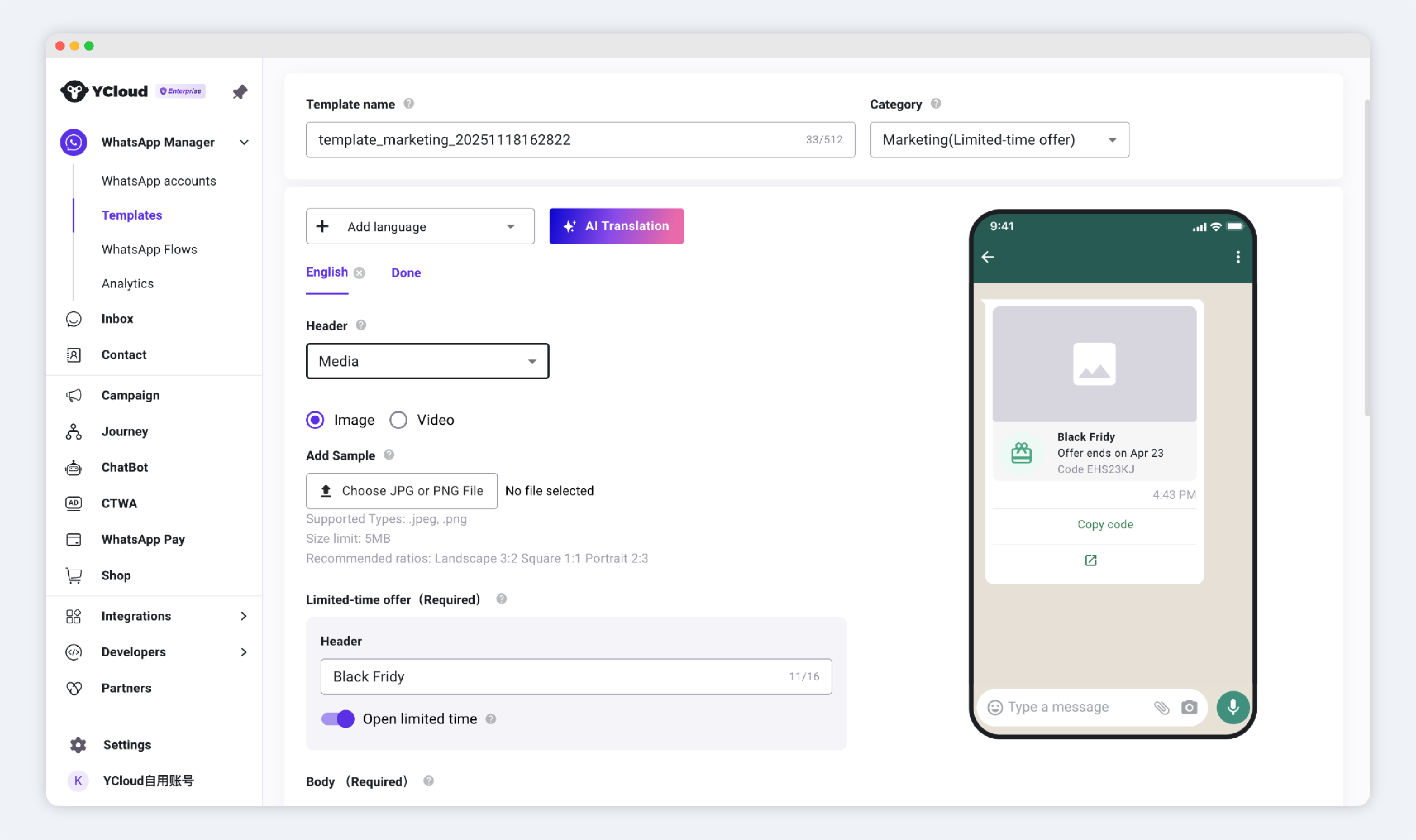
The limited-time offer template consists of a header, a limited-time offer component, body text, and buttons. The limited-time offer component includes the limited-time offer header, the limited-time offer period, and the limited-time offer code, according to the following rules:
* The header is required.
* The "Limited-Time Offer" button is on by default; you can manually turn it off. If the "Limited-Time Offer" button is on, you can upload the specific time of the limited-time offer when submitting this template.
⚠️ You do not need to upload the specific limited-time offer time when creating a limited-time offer template.
* If you choose to add a "Copy Code" button and enter the sample discount code, the limited-time discount code will be displayed. Otherwise, the limited-time discount code will not be displayed.
* The "Visit Website" button is required; the "Copy Code" button is optional.
#### Display Behavior
The following examples show how the component appears on WhatsApp mobile.\
When users view a limited-time offer template message on WhatsApp Web or the desktop app, they will not see the display behavior of the Limited Time Offer component. Instead, they will see a message indicating that they have received a message.
**1. When no expiration time is set**
If no expiration time is set when sending the message, the Limited Time Offer component will not display a specific expiration time, and it will not show the `Offer ended` status.\
If the template includes a `Copy Code` button and a promo code is provided, users will still be able to see and copy the code.
\[Image placeholder: Effect when no expiration time is set]
**2. When an expiration time is set and the offer is still valid**
If an expiration time is set when sending the message and the offer is still valid, the Limited Time Offer component will display the expiration time and the promo code.\
If the template includes a `Copy Code` button, users can copy the code directly.
**3. When an expiration time is set and the offer has expired**
If the offer has passed the configured expiration time,
* the Limited Time Offer component will show `Offer ended`.
* the `Copy Code` button will disappear, and users will no longer be able to copy the code.
### Create a limited-time offer template
You can create limited-time offer templates using YCloud's templates.
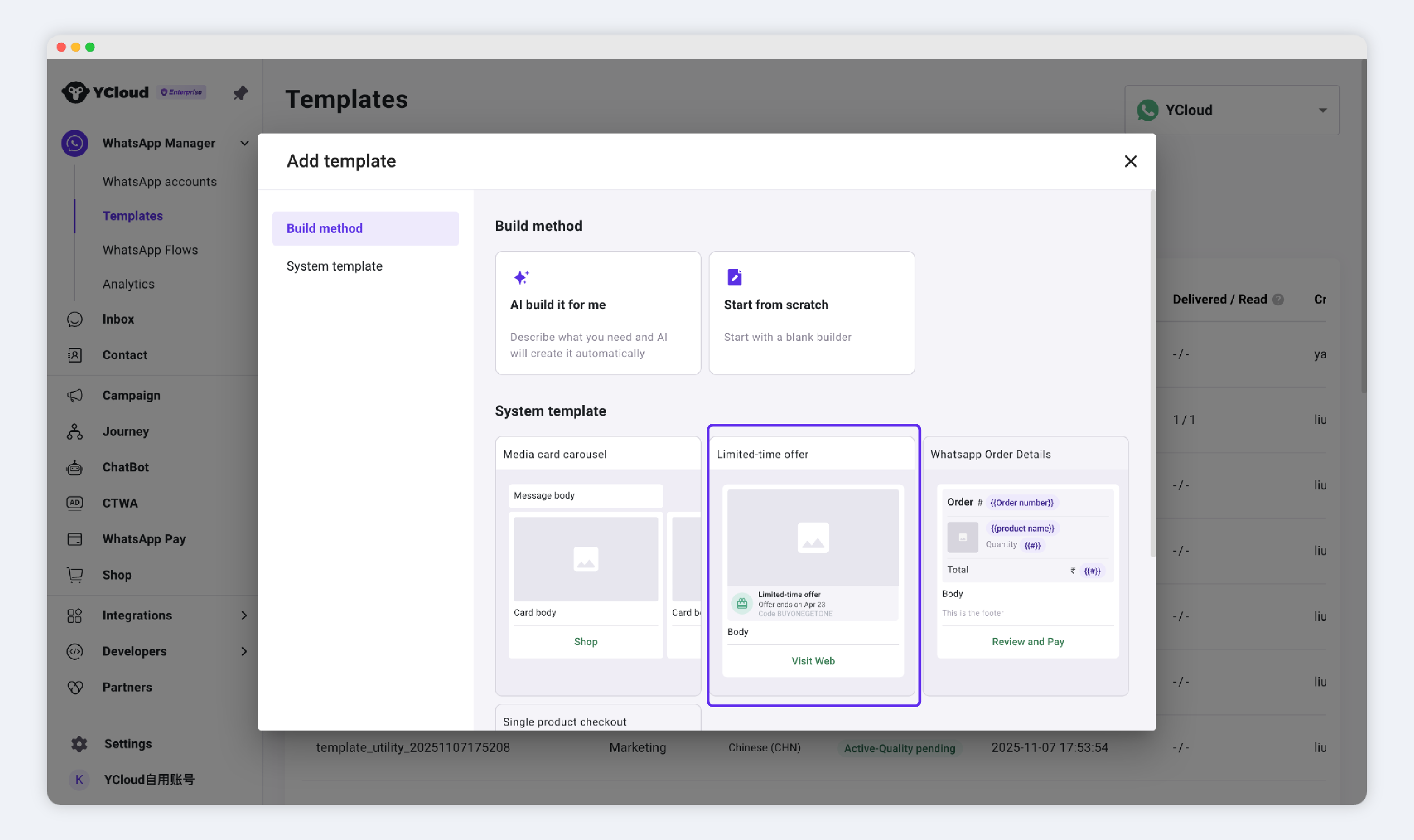
First, select the limited-time offer template under the Marketing Templates directory.
Then, fill in the header, limited-time offer component, body text, and buttons in sequence.
⚠️ Users viewing the limited-time offer template message using the WhatsApp web or desktop application will not see the offer but will receive a message indicating they have received a message.
💡Once the template is approved, you can send this template message in 3 ways:
1. [Inbox: Send it to a contact](https://helpdocs.ycloud.com/help-center/inbox/initiate-new-chat)
2. [WhatsApp Campaign](https://helpdocs.ycloud.com/help-center/campaign/create-a-whatsapp-marketing-campaign)
3. [API: Send it via API](https://docs.ycloud.com/reference/whatsapp_message-send-directly)
***
---
# Agent Instructions
This documentation is published with GitBook. GitBook is the documentation platform designed so that both humans and AI agents can read, navigate, and reason over technical content effectively. Learn more at gitbook.com.
## Querying This Documentation
If you need additional information that is not directly available in this page, you can query the documentation dynamically by asking a question.
Perform an HTTP GET request on the current page URL with the `ask` query parameter, and the optional `goal` query parameter:
```
GET https://helpdocs.ycloud.com/help-center/whatsapp-basics/message-templates/limited-time-offer-template.md?ask=&goal=
```
`ask` is the immediate question: it should be specific, self-contained, and written in natural language.
`goal` is optional and describes the broader end goal you are ultimately trying to accomplish on behalf of the user. GitBook uses it to tailor the answer towards what is most useful for that goal.
The response will contain a direct answer to the question and relevant excerpts and sources from the documentation.
Use this mechanism when the answer is not explicitly present in the current page, you need clarification or additional context, or you want to retrieve related documentation sections.
.png?alt=media&token=4dbb5e48-98c4-4652-b8c8-4fab9423233f)