> For the complete documentation index, see [llms.txt](https://helpdocs.ycloud.com/help-center/llms.txt). Markdown versions of documentation pages are available by appending `.md` to page URLs; this page is available as [Markdown](https://helpdocs.ycloud.com/help-center/account-management/visual-agent.md).
# Visual Agent
### What is a virtual Agent?
Virtual Agent is a capability that enables you to manage WhatsApp conversations with greater flexibility.
It allows a single customer service agent to manage conversations across multiple WhatsApp Business accounts simultaneously, ensuring that messages and customer data can be correctly viewed and followed up on across different usage scenarios.
### Why are virtual Agent required?
In practical business operations, you may encounter the following situations:
#### Scenario One: Mobile devices + platform hybrid usage
* The customer has exceeded WhatsApp's 24-hour free chat window.
* Sales personnel proactively contact customers via the WhatsApp Business App on their mobile devices.
* After the customer has replied, we would like to return to the platform's Inbox to continue managing the conversation centrally.
👉 Without virtual agent, some customer service agents may be unable to view these sessions.
#### Scenario Two: One customer service representative manages multiple WhatsApp accounts.
* Multi-brand operations
* Different countries / markets / channels
* A customer service representative must handle enquiries from multiple numbers simultaneously.
👉 Without unified binding, issues such as fragmented sessions and restricted permissions are likely to arise.
### How do Virtual Agent address these issues?
Through virtual agent, you can:
* Bind a single customer service representative to multiple WhatsApp Business accounts.
* Ensure customer service representatives can view and manage relevant conversations within the Inbox.
* Ensure the consistency of data such as Analytics and Conversation Logs.
* Without affecting existing numbers or automated configurations.
### How to config Virtual Agent?
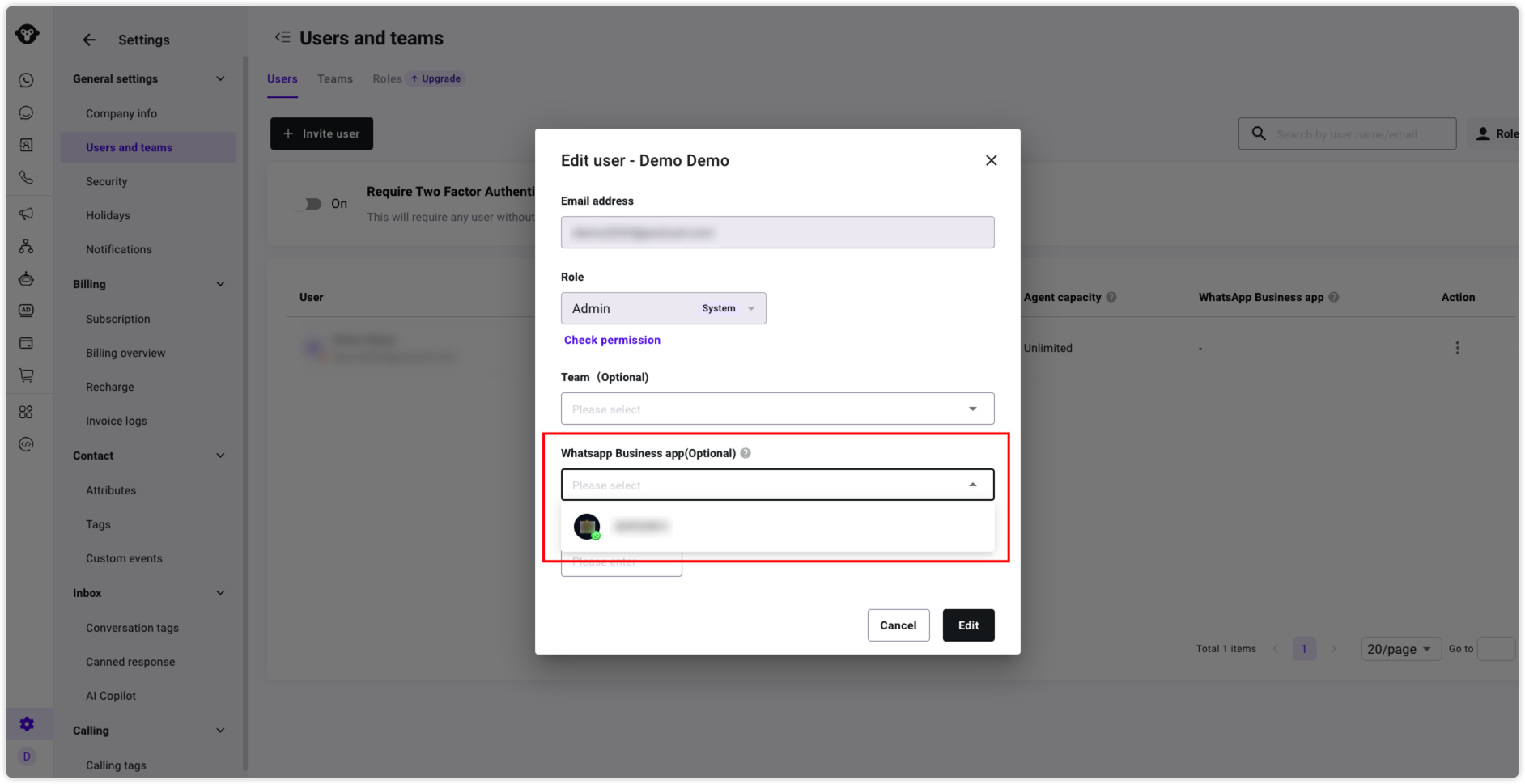
1. Access the YCloud console and bind your WhatsApp Business account under Users and Teams.
2. When inviting users or editing users:
1. Find WhatsApp Business app.
2. Select one or more WhatsApp Business accounts from the dropdown list.
3. Save settings.
> This field is used to control:
>
> Which WhatsApp Business accounts' conversations can this customer service representative manage.
---
# Agent Instructions
This documentation is published with GitBook. GitBook is the documentation platform designed so that both humans and AI agents can read, navigate, and reason over technical content effectively. Learn more at gitbook.com.
## Querying This Documentation
If you need additional information that is not directly available in this page, you can query the documentation dynamically by asking a question.
Perform an HTTP GET request on the current page URL with the `ask` query parameter, and the optional `goal` query parameter:
```
GET https://helpdocs.ycloud.com/help-center/account-management/visual-agent.md?ask=&goal=
```
`ask` is the immediate question: it should be specific, self-contained, and written in natural language.
`goal` is optional and describes the broader end goal you are ultimately trying to accomplish on behalf of the user. GitBook uses it to tailor the answer towards what is most useful for that goal.
The response will contain a direct answer to the question and relevant excerpts and sources from the documentation.
Use this mechanism when the answer is not explicitly present in the current page, you need clarification or additional context, or you want to retrieve related documentation sections.