> For the complete documentation index, see [llms.txt](https://helpdocs.ycloud.com/help-center/llms.txt). Markdown versions of documentation pages are available by appending `.md` to page URLs; this page is available as [Markdown](https://helpdocs.ycloud.com/help-center/zh/whatsapp-pay/overview.md).
# WhatsApp pay介绍
WhatsApp pay 能够帮助商家在WhatsApp app中对客户进行收款,以此可以实现订单催付,购物车弃购等场景。
{% hint style="info" %}
不过,该功能目前仅对**印度**地区的企业和用户开放,且需要您连接指定的第三方支付软件:BillDesk, Razorpay, PayU 和 Zaakpay。
{% endhint %}
## 案例:
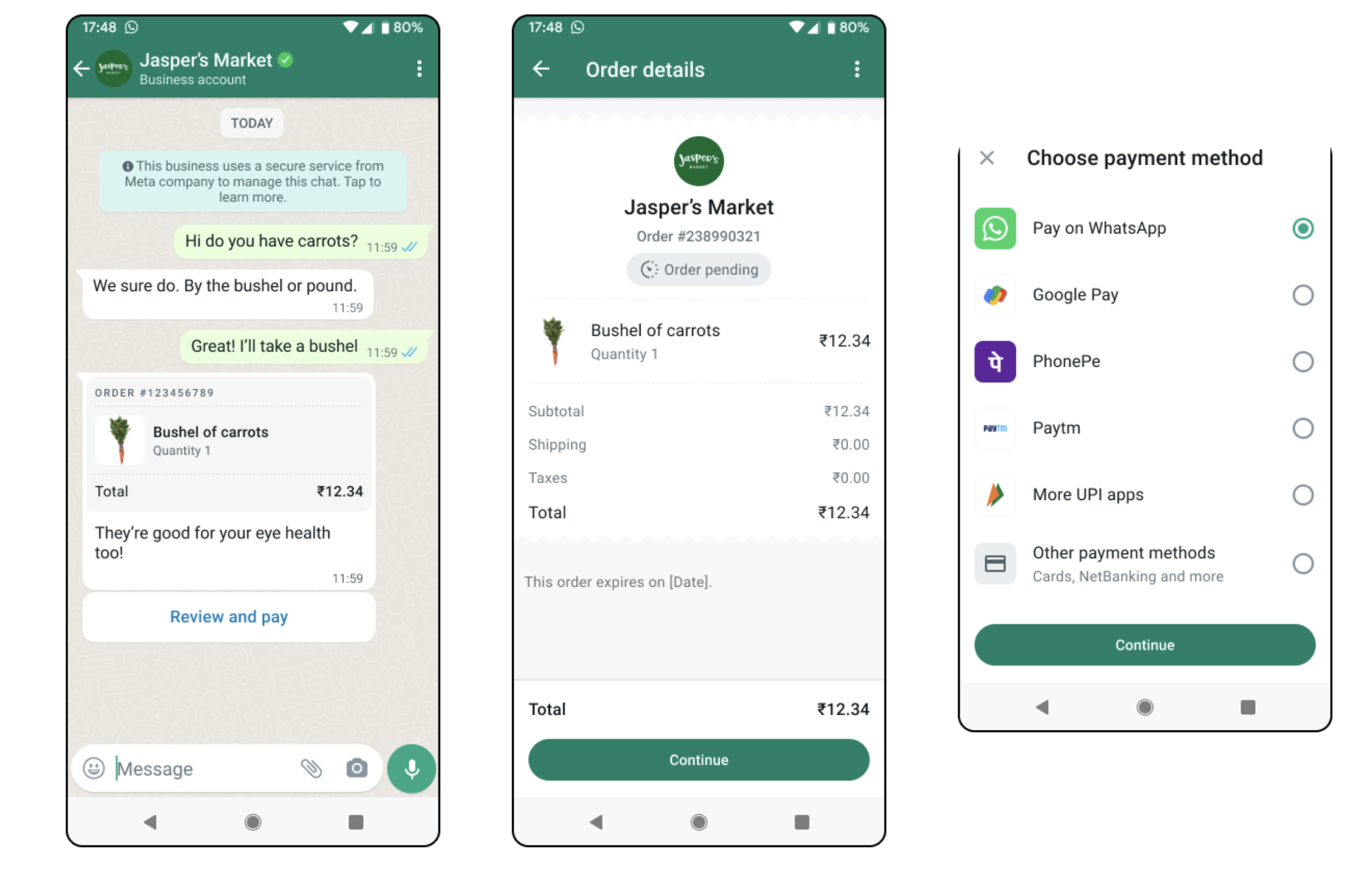
我们来看看商家如何使用WhatsApp pay 的能力完成对消费者的订单催付。
1. 消费者在商家的网站中完成下单,但迟迟未支付。
2. 商家给消费者的订单打了折,然后通过WhatsApp的order details的模板,给消费者发送了一条打折的订单消息。(图1)
3. 消费者收到了消息后,点击**查看并支付**按钮。查看了详细的订单。(图2)
4. 当客户确认订单后点击**继续**按钮。在WhatsApp中唤起了支付方式(图3),消费者可选择自己喜欢的方式完成订单的付款。
## 如何开启WhatsApp pay 的功能
### 步骤1:绑定您的收款账户
{% content-ref url="/pages/9Q0hOr2MsxEBwk2DUVv9" %}
[连接你的收款账户](/help-center/zh/whatsapp-pay/link-your-payment-account.md)
{% endcontent-ref %}
### 步骤2:发送订单详情信息 & 接收消费者支付成功的消息
{% content-ref url="/pages/5kdIg6N76Ovv3lML1vVt" %}
[发送订单详情信息](/help-center/zh/whatsapp-pay/send-order-detail.md)
{% endcontent-ref %}
###
---
# Agent Instructions
This documentation is published with GitBook. GitBook is the documentation platform designed so that both humans and AI agents can read, navigate, and reason over technical content effectively. Learn more at gitbook.com.
## Querying This Documentation
If you need additional information that is not directly available in this page, you can query the documentation dynamically by asking a question.
Perform an HTTP GET request on the current page URL with the `ask` query parameter, and the optional `goal` query parameter:
```
GET https://helpdocs.ycloud.com/help-center/zh/whatsapp-pay/overview.md?ask=&goal=
```
`ask` is the immediate question: it should be specific, self-contained, and written in natural language.
`goal` is optional and describes the broader end goal you are ultimately trying to accomplish on behalf of the user. GitBook uses it to tailor the answer towards what is most useful for that goal.
The response will contain a direct answer to the question and relevant excerpts and sources from the documentation.
Use this mechanism when the answer is not explicitly present in the current page, you need clarification or additional context, or you want to retrieve related documentation sections.